Encoding / Decoding
An encoding scheme is a method of converting one sort of data into another sort of data for example, converting text into numbers. Encoding and decoding function are public knowledge and should be fast and easy to compute.ASCII
ASCII is a 7-bit encoding standard which allows the representation of text using the integers 0-127. see ASCII TableHex
When we encrypt something the resulting ciphertext commonly has bytes which are not printable ASCII characters. If we want to share our encrypted data, it’s common to encode it into something more user-friendly and portable across different systems. Hexadecimal can be used in such a way to represent ASCII strings. First each letter is converted to an ordinal number according to the ASCII table (as in the previous challenge). Then the decimal numbers are converted to base-16 numbers, otherwise known as hexadecimal. The numbers can be combined together, into one long hex string.Base64
Another common encoding scheme is Base64, which allows us to represent binary data as an ASCII string using an alphabet of 64 characters. One character of a Base64 string encodes 6 binary digits (bits), and so 4 characters of Base64 encode three 8-bit bytes.Bytes and Big Integers
Cryptosystems works on numbers, but messages are made up of characters. The most common way is to take the ordinal bytes of the message, convert them into hexadecimal, and concatenate. This can be interpreted as a base-16/hexadecimal number, and also represented in base-10/decimal. Python’s PyCryptodome library implements this with the methodsbytes_to_long() and long_to_bytes().
Scripting tools
Python
Sagemath
Xor
XOR is a bitwise operator which returns 0 if the bits are the same, and 1 otherwise. In textbooks the XOR operator is denoted by ⊕, but in most challenges and programming languages you will see the caret^ used instead.
Xor properties
- Commutative: A ⊕ B = B ⊕ A
- Associative: A ⊕ (B ⊕ C) = (A ⊕ B) ⊕ C
- Identity: A ⊕ 0 = A
- Self-Inverse: A ⊕ A = 0
Symmetric
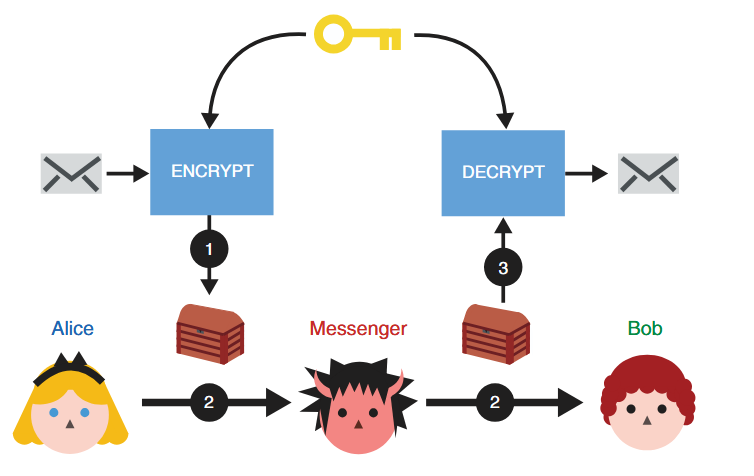
(1) Alice uses the ENCRYPT function with a secret key to transform her message into noise. (2) She then passes the encrypted message to her messenger, who will not learn anything about the underlying message. (3) Once Bob receives the encrypted message, he can recover the original content by using the DECRYPT function with the same secret key Alice used.
AES
The most famous symmetric-key cipher is Advanced Encryption Standard (AES), standardised in 2001. Demonstrasi AES We can split symmetric-key ciphers into two types, block ciphers and stream ciphers. Block ciphers break up a plaintext into fixed-length blocks, and send each block through an encryption function together with a secret key. Stream ciphers meanwhile encrypt one byte of plaintext at a time, by XORing a pseudo-random keystream with the data. AES is a block cipher but can be turned into a stream cipher using modes of operation such as CTR. Block ciphers only specify how to encrypt and decrypt individual blocks, and a mode of operation must be used to apply the cipher to longer messages.Mode Operasi AES
- ECB (Electronic Codebook)
- CBC (Cipher Block Chaining)
- CTR (Counter)
- GCM (Galois/Counter Mode)
Attack
- https://github.com/jvdsn/crypto-attacks/tree/master/attacks
- https://github.com/ashutosh1206/Crypton/tree/master/Block-Ciphers
- https://book.jorianwoltjer.com/cryptography/aes
- https://github.com/Merricx/aes-attack
Asymmetric
Asymmetric encryption
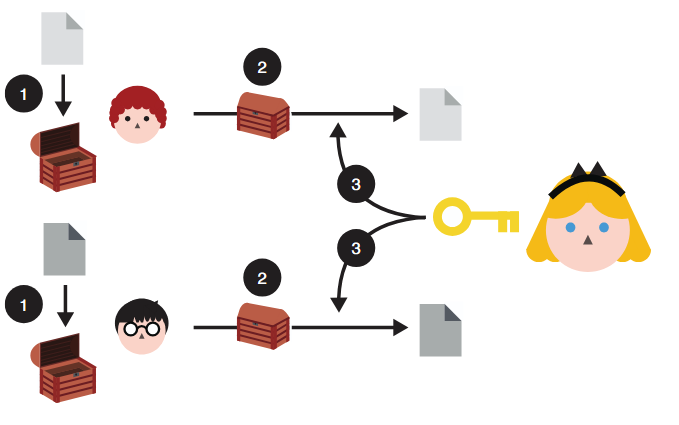
To use asymmetric encryption, Queen Alice needs to first publish her public key (represented as an open box here). Now, anyone can use the public key to encrypt messages to her. And she should be able to decrypt them using the associated private key.
Asymmetric encryption: (1) anyone can use Queen Alice’s public key to encrypt messages to her. (2) After receiving them, (3) she can decrypt the content using her associated private key. Nobody is able to observe the messages directed to Queen Alice while they are being sent to her.
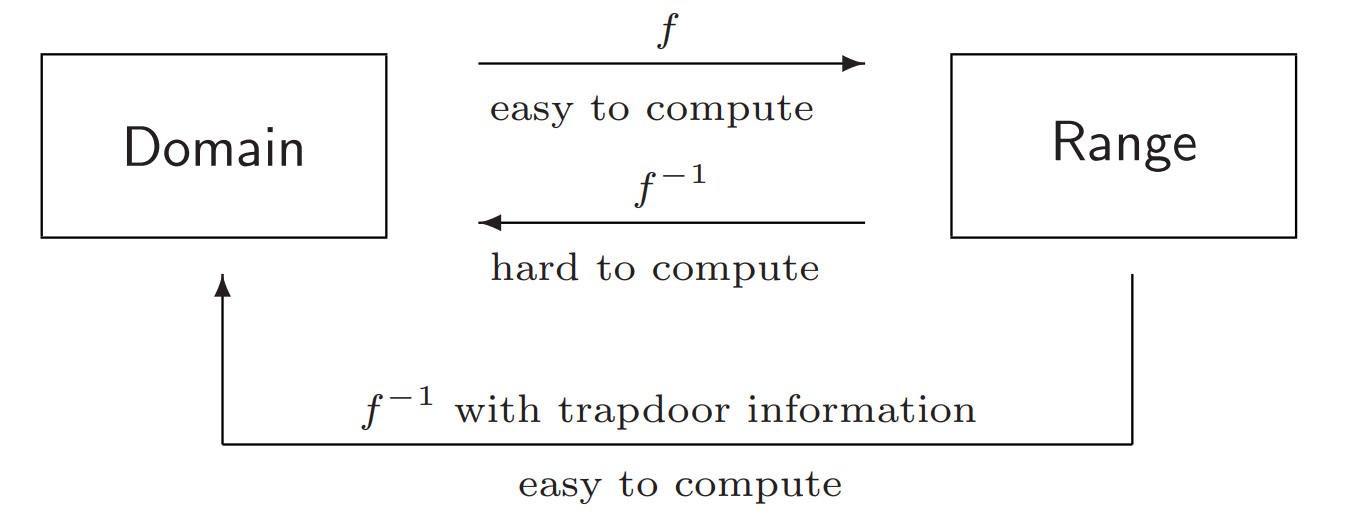
RSA
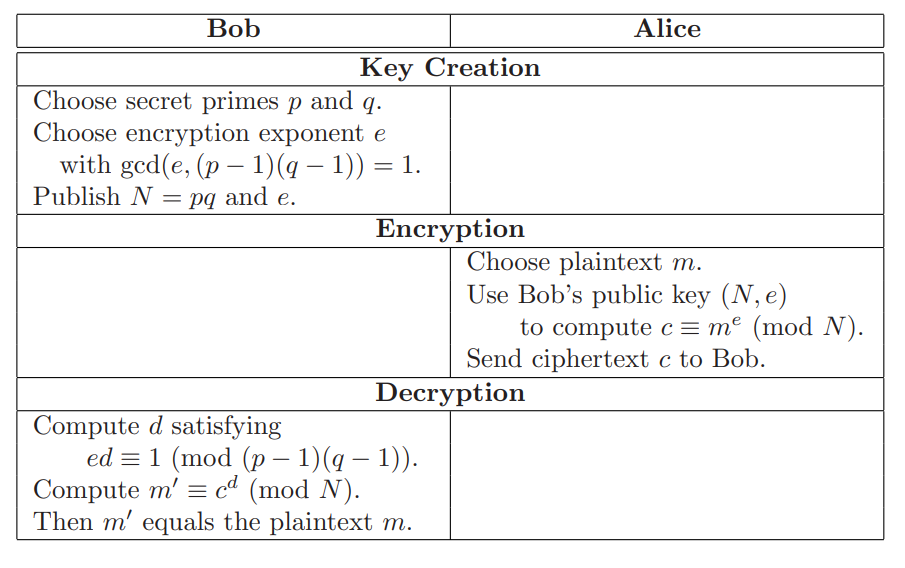
- Encrypt
- Decrypt
rsa.py
Attack
Twenty Years of Attacks on the RSA Cryptosystem Implementation- https://github.com/ashutosh1206/Crypton/tree/master/RSA-encryption
- https://github.com/jvdsn/crypto-attacks/tree/master/attacks/rsa
Diffie–Hellman key exchange
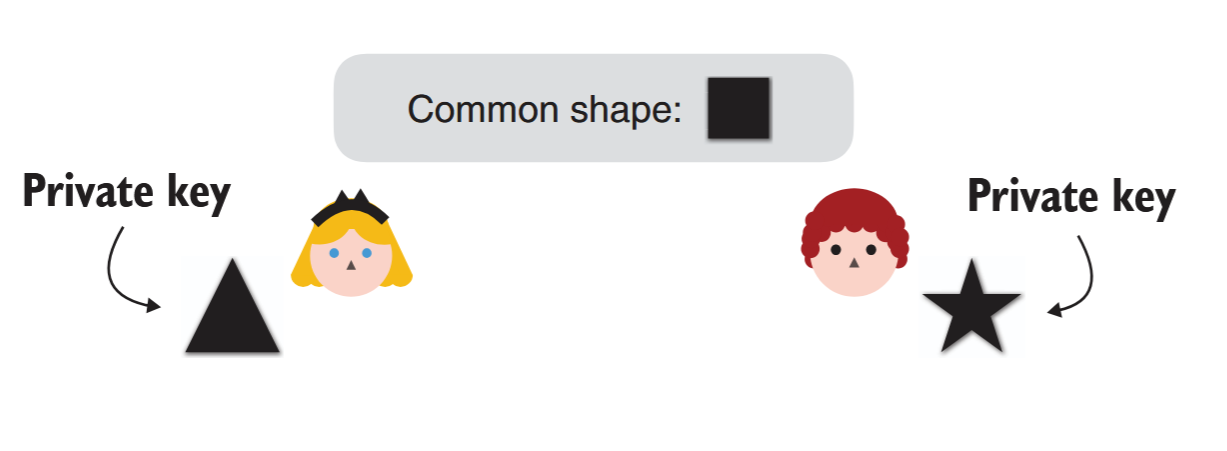
in our analogy, Queen Alice chooses a triangle as her private key, whereas Lord Bob chooses a star as his private key.
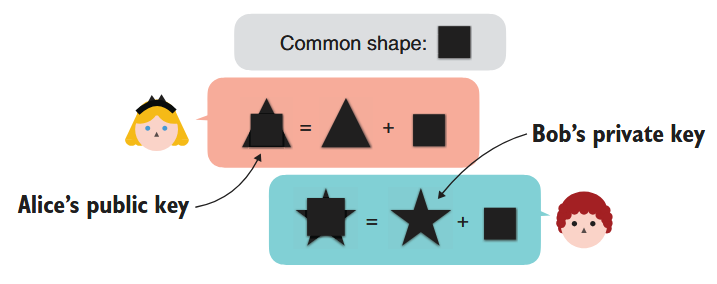
The second step of a DH key exchange where both participants exchange their public keys. Participants derive their public keys by combining their private keys with a common shape.
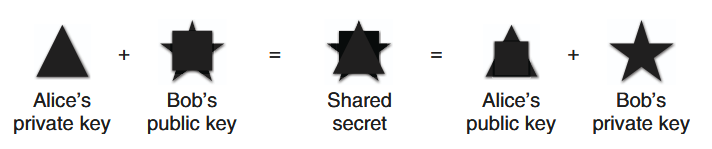
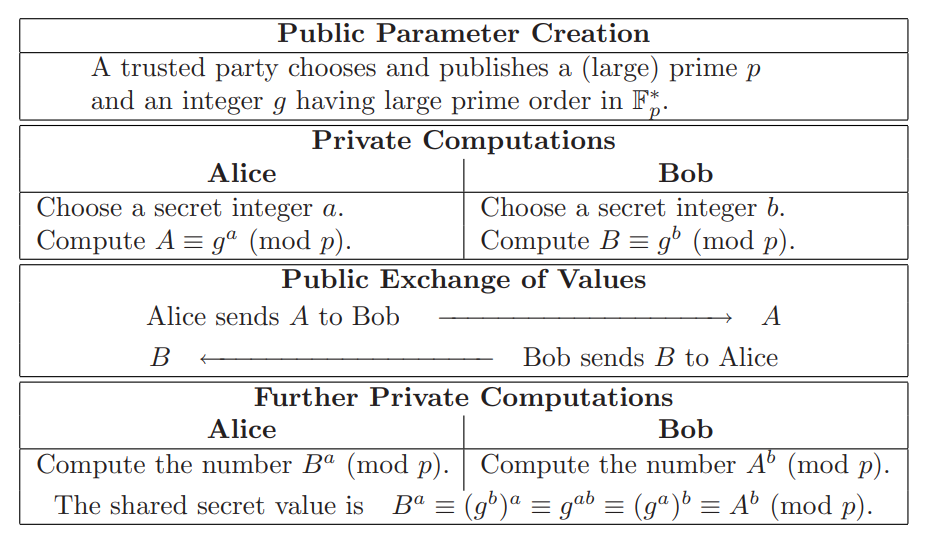
The final step of a DH key exchange where both participants produce the same shared secret. To do this, Queen Alice combines her private key with Lord Bob’s public key, and Lord Bob combines his private key with Queen Alice’s public key. The shared secret cannot be obtained from solely observing the public keysMathematical Formulation of the Diffie–Hellman Key Exchange Protocol
Man In The Middle

Digital Signatures
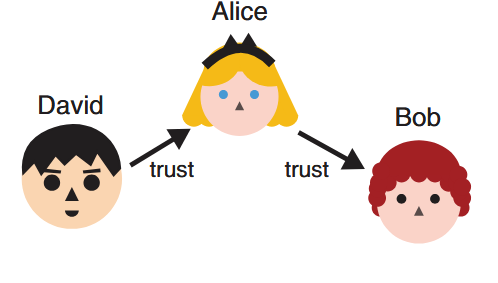
Lord David already trusts Queen Alice. Because Queen Alice trusts Lord Bob, can Lord David safely trust Lord Bob as well?
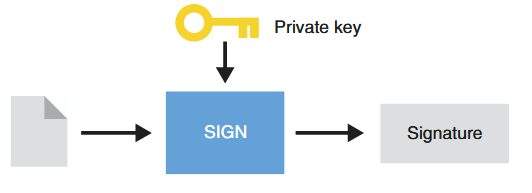
To sign a message, Queen Alice uses her private key and generates a signature.
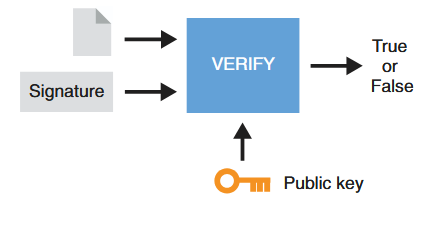
To verify a signature from Queen Alice, one also needs the message signed and Queen Alice’s public key. The result is either validating the signature or invalidating it.
Hybrid
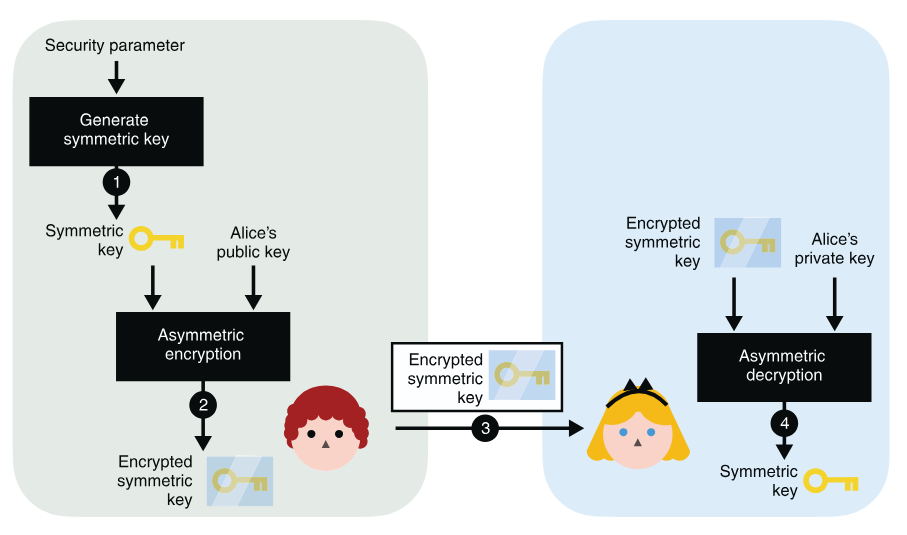
To use asymmetric encryption as a key exchange primitive, you can (1) generate a symmetric key and (2) encrypt it with Alice’s public key. After (3) sending it to Alice, she can (4) decrypt it with her associated private key. At the end of the protocol, you both have the shared secret, while no one else is able to derive it from observing the encrypted symmetric key alone.
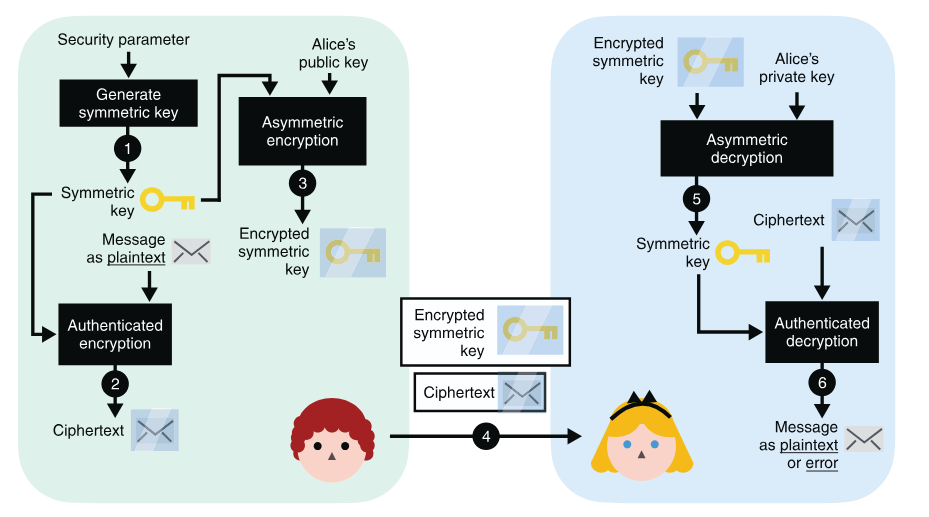
(4) after you send both the encrypted symmetric key and the encrypted message to Alice, (5) Alice decrypts the symmetric key using her private key. (6) She then uses the symmetric key to decrypt the encrypted message. (Note that steps 5 and 6 can both fail and return errors if the communications are tampered with by a MITM attacker at step 4.)
Hash Function
In cryptography, hash functions transform input data of arbitrary size (e.g. a text message) to a result of fixed size (e.g. 256 bits), which is called hash value (or hash code, message digest, or simply hash).Security properties of a hash function
- pre-image resistance
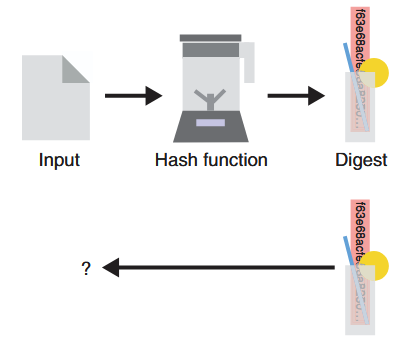
Given the digest produced by a hash function (represented as a blender here), it is impossible (or technically so hard we assume it will never happen) to reverse it and find the original input used. This security property is called pre-image resistance.
- second pre-image resistance
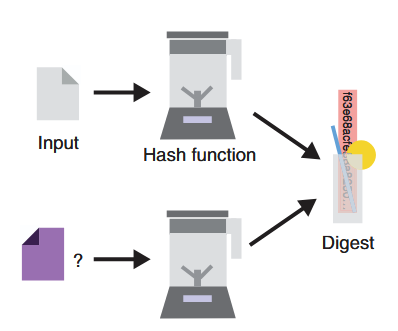
Considering an input and its associated digest, one should never be able to find a different input that hashes to the same output. This security property is called second pre-image resistance.
- collision resistance
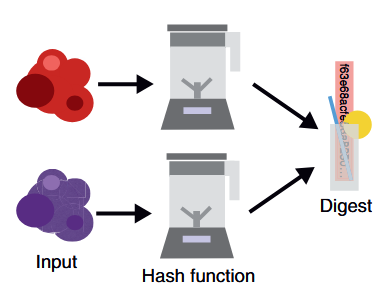
One should never be able to find two inputs (represented on the left as two random blobs of data) that hash to the same output value (on the right). This security property is called collision resistancePlay with most popular cryptographic hash functions online: https://www.fileformat.info/tool/hash.htm.
Secure Hash Algorithms
- SHA-2 is a family of strong cryptographic hash functions: SHA-256 (256 bits hash), SHA-384 (384 bits hash), SHA-512 (512 bits hash), etc.
- SHA-3 (and its variants SHA3-224, SHA3-256, SHA3-384, SHA3-512), is considered more secure than SHA-2 for the same hash length.
- Keccak-256, which is used in the Ethereum blockchain, is a variant of SHA3-256 with some constants changed in the code.
- BLAKE2 / BLAKE2s / BLAKE2b .BLAKE is one of the finalists at the SHA-3 NIST competition. The BLAKE2 hash function has similar security strength like SHA-3, but is less used by developers than SHA2 and SHA3.
- RIPEMD-160 is a secure hash function, widely used in cryptography, e.g. in PGP and Bitcoin.SHA-2 and SHA-3 are more stronger than RIPEMD, due to higher bit length and less chance for collisions.
Other Secure Hash Functions
alternatives to SHA-2, SHA-3 and BLAKE2:- Whirlpool
- SM3 is the crypto hash function, officialy standartized by the Chinese government. It is similar to SHA-256 and produces 256-bit hashes.
- GOST (GOST R 34.11-94) is secure cryptographic hash function, the Russian national standard, described in RFC 4357
Insecure Hash Algorithms
SHA0, SHA1, MD2, MD4, MD5, Panama, HAVAL, Tiger, and SipHash.Attack
Length-extension Attack
length extension attack is a type of attack where an attacker can use Hash(message1) and the length of message1 to calculate Hash(message1 ‖ message2) for an attacker-controlled message2, without needing to know the content of message1. Implementation tools:- https://github.com/thecrabsterchief/hash-length-extension
- https://github.com/stephenbradshaw/hlextend
Birthday Attack/mitm
A birthday attack is a bruteforce collision attack that exploits the mathematics behind the birthday problem in probability theory. Implementation tools:Password Cracking
Password cracking (also called password hacking) is an attack vector that involves hackers attempting to crack or determine a password for unauthorized authentication. Pada modul ini kita akan melakukan jenis serangan Dictionary Attack. Dictionary Attack akan mencoba meng-hash baris per baris dalam wordlist dan akan membandingkannya dengan hash yang telah dibocorkan. Apabila hashnya sama maka password sebenarnya telah ditemukan.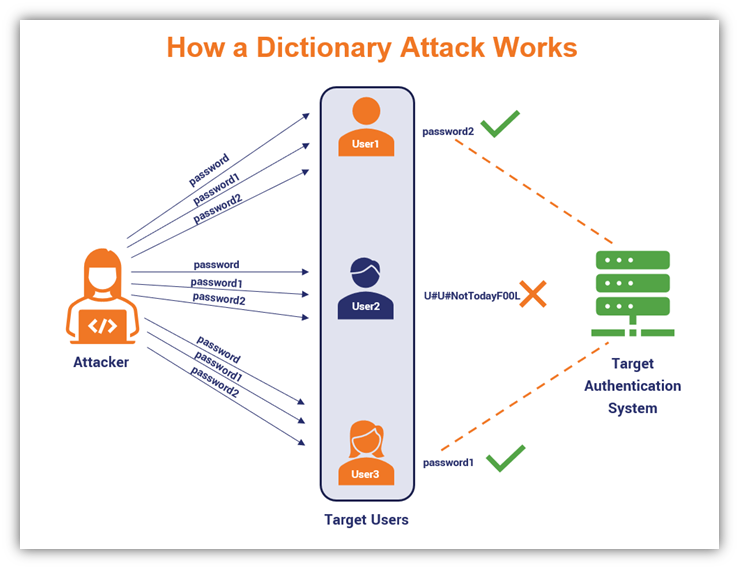
John the Ripper
John adalah command-line tool yang paling mudah digunakan dan ramah pemula untuk password cracking. Asumsikan kita memiliki filehashes.txt dengan konten sebagai berikut:
john -h atau man john untuk detail lebih lanjut. Atau gunakan cheatsheet dibawah ini untuk kasus-kasus dimana john sering digunakan:
Hashcat
Hashcat adalah alternatif lain untuk tool cracking password. Hashcat sendiri menawarkan fitur yang lebih advanced cara umum untuk crack password menggunakan Hashcat adalah seperti berikutattack mode adalah jenis serangan yang akan dipakai.
hash type adalah jenis hash yang dicoba untuk di crack. tanpa menspesifikan hash type, Hashcat akan mencoba menentukan tipe hash secara otomatis, namun hal ini tidak akan selalu berhasil.
Identify hash types
Dalam contoh ini kita akan menggunakan jenis hash tipe NetNTLMv2 yang dipakai oleh Windows dan Active Directory.
hashcat -h atau man hashcat untuk detail lebih lanjut. Atau gunakan cheatsheet dibawah ini untuk kasus-kasus dimana hashcat sering digunakan: